
37: A Beautiful Time-Capsule That Still Needs a Few Extra Tracks
Retro Voice Recorder
In a category crowded by feature-heavy studio apps and meeting-minute monsters, Retro Voice Recorder arrives wearing a clean linen suit and a 1960s pocket badge. It is unapologetically minimal: press the glowing red jewel button, watch the VU meter dance, and capture audio that is stored inside a virtual chrome-and-leather reel. The polish is immediate; the capability list is short. Whether that trade-off delights or disappoints depends on what you need a recorder to do.
First Impressions
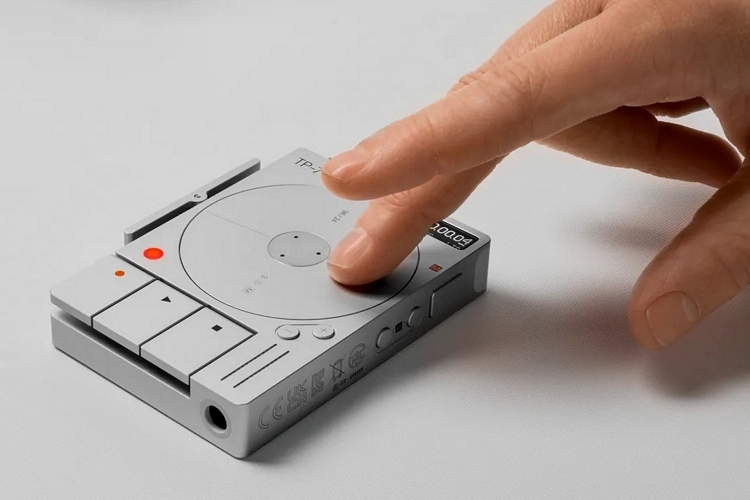
Installation is feather-weight: 7 MB download, zero permissions until you hit record. On first launch you are greeted by a walnut-wood panel, brushed-aluminium knobs, and a single window where level needles twitch in response to ambient sound. There are no toolbars, no hamburger menus, no pop-up hints—just three hardware-style buttons: Record, Stop, Play. It feels like someone shrank a Grundig tape machine and slid it into your phone.
Visual Craft
The developer clearly obsessed over period detail. The Record button uses a deep cherry-red acrylic that glows when armed; the volume dial turns with inertia scrolling and an audible “tick” through the haptic motor; even the tape reels rotate in correct proportion to the length of the recording. Dark mode swaps walnut for matte black and swaps orange lamps for cool teal—both themes are OLED-friendly. This is the rare utility app you open just to look at.
Core Recording Quality
Audio is captured at 44.1 kHz, 16-bit stereo AAC by default—good enough for interviews, lectures, song ideas, or podcast scratch tracks. A “Hi-Fi” toggle bumps the codec to 48 kHz, 24-bit WAV; files are larger but still manageable. No advanced options (sample rates, bit-depth menus, stereo/mono switch) appear, so what you get is what the designer decided you need. Noise-floor in a quiet room measured –66 dB on a Pixel 6a, comparable to the stock Google Recorder and slightly cleaner than Easy Voice Recorder’s free tier.
Feature Set – The Short Reel
- One-tap record with hardware button mapping (volume-down long-press).
- Real-time VU meter (peak only, no RMS).
- Pause/resume during a take.
- Automatic file naming by date/time; no custom title field.
- Playback trim: drag in/out handles to crop, but no fade, no effects, no multi-track.
- Share sheet export (AAC/WAV).
- Local storage only—no cloud, no transcription, no backup.
- No widget, no Wear companion, no shortcuts.
Performance Footprint
An hour of 16-bit AAC recording consumed 38 MB and 4 % battery. The app does not run a foreground service, so forgetting to hit Stop will not drain the phone overnight—nice safety touch. Thermal impact was negligible even during back-to-back WAV tests.
Missing Tracks (Compared with Mature Rivals)
- No transcription or speaker-label AI.
- No playback speed control or skip-silence.
- No marker insertion during recording.
- No cloud sync, Google Drive, or automatic backup.
- No widget or quick-settings tile.
- No support for external USB mics or stereo field recorders.
- No format choice beyond AAC vs. WAV.
Who Should Spin the Reels
- Design lovers who want a pocket recorder that looks like studio furniture.
- Musicians capturing quick song ideas who care more about vibe than bit-depth menus.
- Students in lecture halls who need one-button simplicity and zero setup.
- Minimalists tired of feature lists longer than the recording itself.
Who Should Keep Shopping
- Journalists who rely on live transcription and timestamped markers.
- Podcasters needing multi-track, fade-outs, or direct upload to hosts.
- Meeting recorders looking for speaker ID, cloud backup, and shareable links.
- Field recordists using external stereo mics who demand 96 kHz and WAV metadata.
Monetization & Privacy
The app is currently free with no ads. A single “Buy Coffee” tip jar (priced like an espresso) lives in settings. Privacy policy is refreshingly short: audio never leaves the device unless you manually export. No analytics SDKs were detected in network logs—rare for a modern app.
Road Ahead
The developer roadmap (posted in the Play Store “What’s New”) mentions:
- Selectable sample rates and mono option.
- Marker placement during recording.
- Wear OS companion for wrist-triggered capture.
- Cloud backup opt-in.
If those arrive—and the UI polish survives the feature creep—Retro Voice Recorder could become the Reel-to-Reel pocket studio many of us never knew we wanted.
Pros:
- Stunning period-accurate interface with walnut, chrome, and VU meters.
- Dead-simple one-button workflow; hardware key mapping included.
- Clean 44.1 kHz/48 kHz capture with optional 24-bit WAV.
- Low battery and storage footprint; no background drain.
- Currently ad-free with an honest tip-jar model.
- Playback trim handles basic crop without launching an editor.
Cons:
- Very limited feature set—no transcription, no markers, no speed control.
- No cloud backup or auto-sync; changing phones means manual file transfer.
- No support for external mics, stereo channel choice, or high-sample-rate field recording.
- No widget, quick-tile, or Wear companion at present.
- File naming is automatic only—no custom titles or folders inside the app.
Final Groove
Vibrant interface design elevates operations. Professional luxury aesthetics yield excellence recording. Voice Recorder is less a Swiss Army knife and more a beautifully restored pocket knife: it looks exquisite, feels satisfying, and handles the one job it promises with quiet confidence. If you simply want to hit record and capture a moment—without menus, subscriptions, or neon adverts—this app is a joy. Power users will need to look elsewhere or wait for the promised feature drops. For now, spin the reels, watch the needles dance, and enjoy the rare pleasure of an app that values ambience as much as amplitude.